Binance + Bybit + OKX: How to See All Your Balances in One Dashboard
See Binance, Bybit, and OKX balances in one dashboard, with free and locked funds clearly separated across accounts, assets, subaccounts, and wallets.
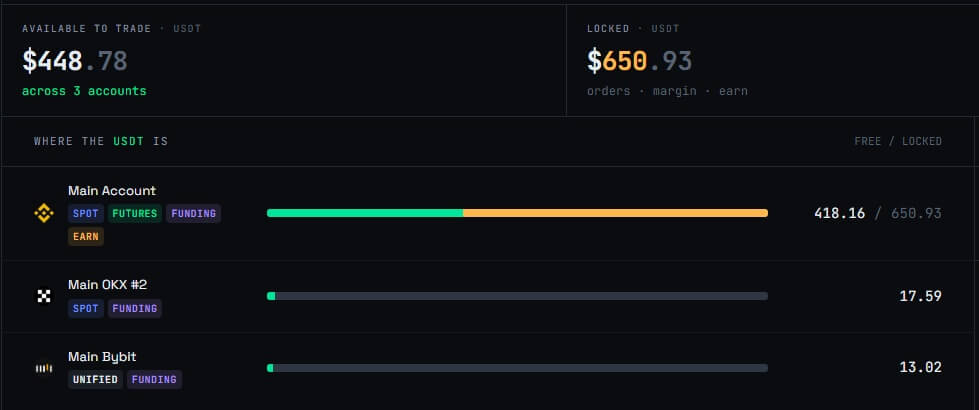
Holding funds on three exchanges does not create one portfolio view. It creates three account systems, each with its own wallets, subaccounts, margin rules, and balance labels.
The total may look simple from a distance. Add the stablecoins, value the other assets in dollars, and combine the results. In practice, that number says little about how much capital is ready to use.
Some funds are available. Some are reserved for orders, posted as margin, pending transfer, or held in another account type. A useful dashboard has to preserve those differences.
Why the same balance can mean different things
An exchange account rarely has one balance.
A single asset can appear in spot, derivatives, funding, options, earn, or subaccounts. Depending on the venue's account model, some of those balances may be separate while others share collateral.
This creates several numbers that look interchangeable but are not:
Total balance is the full amount recorded in the account.
Available or free balance is the portion that can generally be used for a new order, transfer, or withdrawal.
Locked balance is tied to open orders, margin, or another product.
Equity may include unrealized PnL from derivatives positions.
Wallet balance may exclude unrealized PnL while still including realized funding and fees.
The exact labels vary. The underlying distinction does not. Nominal holdings and deployable capital are different numbers.
If a dashboard combines only the totals, it can overstate how much liquidity the trader has for the next position.
Why three native dashboards are not enough
Each exchange provides a detailed view of its own accounts. The gap appears when the question crosses venues.
A trader may want to know how much free USDT is available right now. Answering that requires opening each platform, selecting the correct account, checking whether funds are locked, and then adding the usable amounts.
The process gets slower when subaccounts are involved. A main account may hold reserves, one subaccount may run spot strategies, and another may contain derivatives margin. The exchange-level total can hide that structure.
Valuation also moves while the tabs are open. If the portfolio contains BTC, ETH, stablecoins, and smaller assets, each native dashboard may use a slightly different reference price or reporting currency. Totals copied several minutes apart are not one synchronized snapshot.
Three correct dashboards can still produce an unclear portfolio.
The spreadsheet approach
A spreadsheet is usually the first attempt at consolidation. Create one row per exchange and asset, then record total, free, and locked amounts.
A basic layout might include:
venue and account name;
asset;
total balance;
free balance;
locked or reserved amount;
reporting-currency price;
converted value;
last update time.
This is enough for a slow-moving treasury. It becomes tedious for active trading.
Open orders change locked balances. Futures positions consume margin. Funding and fees alter account equity. Transfers move capital between wallets. A deposit may appear on-chain before the receiving exchange credits it.
Manual updates introduce another problem: inconsistent timing. If the first exchange is copied at 09:00 and the last at 09:15, the spreadsheet does not represent the portfolio at either time.
A sheet is useful for periodic reconciliation and custom analysis. It is a poor live balance tracker.
APIs turn balances into structured data
Read-only exchange APIs can retrieve balances without allowing the connected application to trade or withdraw funds. This removes the need to copy each number by hand.
The raw responses still differ. Asset symbols, account types, status fields, precision, and balance categories have to be mapped into a common format. One API may return free and locked values directly. Another may require several account endpoints to explain the same asset.
A unified service also needs rules for valuation. Stablecoins should not always be assumed to equal exactly one dollar, and non-dollar collateral needs a defined conversion price. The dashboard should retain the original asset amount even after converting it into a reporting currency.
Subaccounts need stable identifiers as well. Combining them into the venue total is useful, but traders still need to see where the funds actually sit.
API synchronization introduces its own failure modes. Credentials expire, permissions change, rate limits are reached, and exchanges undergo maintenance. A failed sync should be shown clearly. Silently reusing an old balance makes the consolidated total unreliable.
What a Binance Bybit OKX portfolio tracker should show
The dashboard should answer more than "How much do I own?"
It should show:
total value across all connected accounts;
balances grouped by asset and venue;
free and locked amounts kept separate;
account and subaccount labels;
spot, derivatives, and other wallet types where supported;
current valuation in a consistent reporting currency;
the timestamp and status of the last successful sync;
deposits, withdrawals, and internal transfers that explain balance changes.
The asset view and venue view serve different purposes.
The asset view answers questions such as: How much USDT is available across the portfolio? Where is the BTC held? Which account can fund a new position without a transfer?
The venue view shows concentration. It makes it easier to see whether too much capital sits on one exchange or whether a hedge depends on funds trapped in a different account.
Both views should allow drill-down. A combined total that cannot be traced back to an account is difficult to audit.
Free balance matters more than the headline total
Suppose a portfolio dashboard shows 300,000 USDT across three venues. That sounds like 300,000 USDT of available capital.
It may not be.
Part could be reserved by open orders. Another portion may support derivatives positions. Some may sit in a subaccount that cannot fund the intended trade without an internal transfer. A pending withdrawal may already be deducted from one field but not yet visible elsewhere.
For active traders, the useful question is usually not "What is the total?" It is "What can I deploy without disturbing existing positions?"
That is why free and locked balances should remain separate at every level: account, venue, asset, and portfolio.
Transfers should not look like profit or loss
Balance changes need context.
Moving 25,000 USDT from one exchange to another reduces the first account and increases the second. The combined portfolio is unchanged apart from fees. If the dashboard reads accounts at different times, it can briefly show the transfer as a loss, a gain, or both.
Pending deposits and withdrawals need their own status. So do internal transfers between spot and derivatives wallets. Treating all balance changes as trading performance corrupts the PnL record.
A balance dashboard should therefore connect current holdings with transfer history. The trader can then tell whether an account changed because of trading, funding, fees, or a capital movement.
Seeing all three exchanges in ArbLens
ArbLens consolidates supported CEX accounts, perpetual DEXs, and on-chain wallets in one dashboard. Balances can be viewed by asset, venue, and account without flattening everything into one unexplained total.
Free and locked amounts remain separate, making it easier to see which venue can fund the next trade. If an account cannot sync, the balance is marked as stale or unconfirmed rather than silently presented as current.
The same dashboard includes open positions, PnL, funding payments, fills, and transfer history. This connects the balance with the activity that changed it. Traders running hedged positions can also view paired legs and spot unhedged exposure without moving between exchange tabs.
ArbLens uses read-only API keys and does not require trading or withdrawal permissions. It monitors accounts but cannot place orders or move funds.
How to set up a unified balance view
Start by listing every account that holds capital. Include main accounts, subaccounts, spot wallets, derivatives accounts, and any supported on-chain wallets used for transfers or collateral.
Create read-only API keys for each exchange. Enable only the data permissions needed by the tracker. Trading and withdrawal access should remain disabled. Use IP restrictions when the exchange supports them and they fit the connection setup.
After connecting the accounts, verify several balances manually:
Pick one stablecoin and compare its total, free, and locked amounts.
Check an asset used as derivatives collateral.
Confirm that each expected subaccount appears.
Review one recent deposit, withdrawal, or internal transfer.
Check the last successful sync time for every connection.
Do not skip the locked balance check. Two systems may show the same total while disagreeing about what is available because one connection is missing open-order or margin data.
Repeat the verification after creating a new subaccount, changing an account mode, or rotating an API key.
A dashboard does not remove exchange risk
Consolidation improves visibility. It does not merge custody.
Funds remain on the connected exchanges and wallets. Withdrawal rules, account restrictions, maintenance windows, and counterparty exposure still apply separately to each venue. A combined number should not make that distribution invisible.
This is another reason to keep the venue breakdown close to the portfolio total. The dashboard should make concentration easier to see, not hide it behind a clean interface.
The useful number is deployable capital
A portfolio total is a starting point. For day-to-day operations, traders need to know where the assets sit and how much is free to move.
A good multi-exchange balance tracker keeps total, free, and locked funds separate; preserves account and subaccount detail; marks stale data; and connects balance changes with transfer and trading history.
Once those pieces are in place, checking three exchanges stops being a tab-management task. The portfolio becomes one view without losing the details that make the number useful.